Hello everyone, to continue our journey toward TryHackMe SOC Level 1 certification, today we will be tackling the ItsyBitsy room.
During normal SOC monitoring, Analyst John observed an alert on an IDS solution indicating a potential C2 communication from a user Browne from the HR department. A suspicious file was accessed containing a malicious pattern THM:{ ________ }. A week-long HTTP connection logs have been pulled to investigate. Due to limited resources, only the connection logs could be pulled out and are ingested into the connection_logs index in Kibana.
Our task in this room will be to examine the network connection logs of this user, find the link and the content of the file, and answer the questions.
Task 1: Setup and Connect Lab
(No questions for this task)
Task 2: Scenario - Investigate a potential C2 communication alert
1. How many events were returned for the month of March 2022?
Open Discover and set date.

Flag: 1428
2. What is the IP associated with the suspected user in the logs?
For this question, I examined the source IP addresses across the entire filtered log and found only two addresses, the correct answer is one of those two.
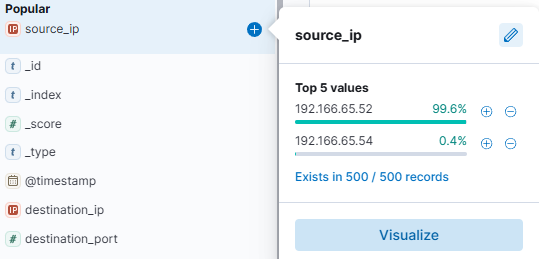
Flag: 192.166.65.54
3. The user’s machine used a legit windows binary to download a file from the C2 server. What is the name of the binary?
Leveraging the results from the previous IP address, we apply a GET method filter to identify the downloaded item, easily obtaining a log like the following:
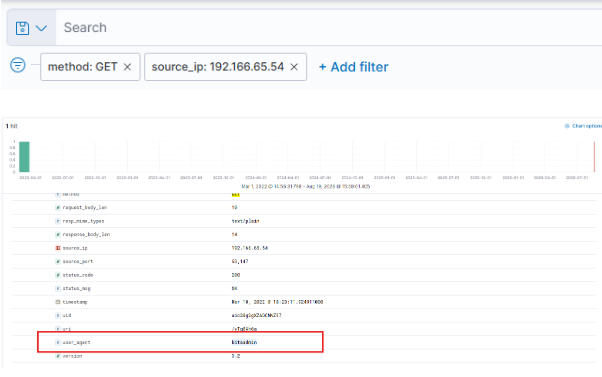
Flag: bitsadmin
4. The infected machine connected with a famous filesharing site in this period, which also acts as a C2 server used by the malware authors to communicate. What is the name of the filesharing site?
The server mentioned here is the very location from which the C2 malware is downloaded, we can clearly see this in the log.
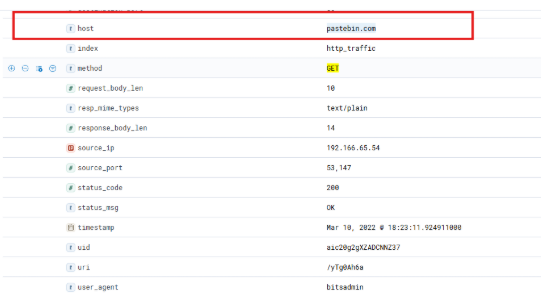
Flag: pastebin.com
5. What is the full URL of the C2 to which the infected host is connected?
Upon investigating the traffic flows from the infected server, we observed that after the malware was downloaded, a separate log entry showed the execution of an HTTP HEAD method; a closer examination of that log revealed communication with the specific target address.
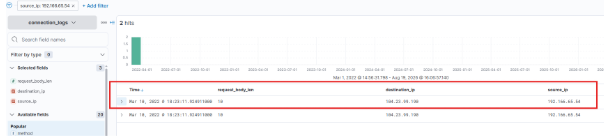
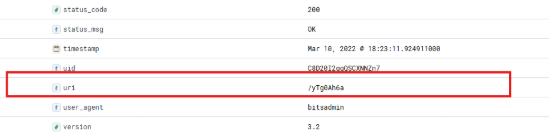
Flag: pastebin.com/yTg0Ah6a
6. A file was accessed on the filesharing site. What is the name of the file accessed?
Paste the link you just found into your browser and see what it is.
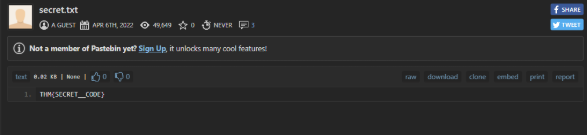
Flag: secret.txt
7. What is the flag?
Flag: THM{SECRET__CODE}
Thank you for reading my blog, see you later!