For this scenario, it seems like we are going to investigate an email received from one of our sales executive. The executive wasn’t expecting an email from this customer, along with money being transferred to his account and an attachment that was not requested.
Task 1:What is the Transfer Reference Number listed in the email’s Subject line?
As soon as we open the challenge file in Thunderbird mai, the answer is right there before our eyes; the visible headers alone allow us to answer many of the questions below
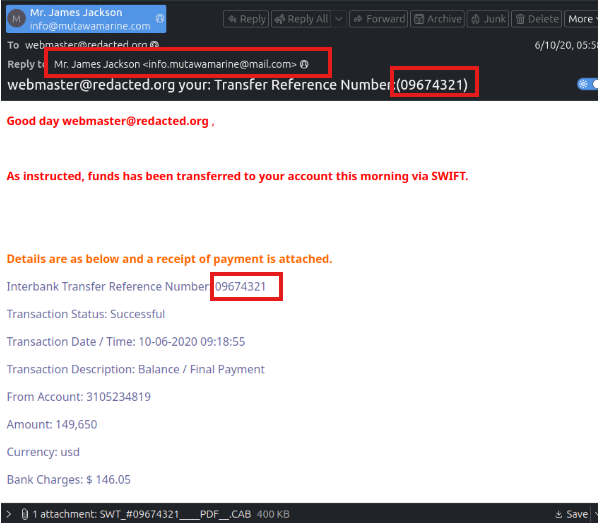
Flag: 09674321
Task 2: What is the display name of the sender?
Flag: Mr.James Jackson
Continue investigating the email headers.
Task 3: What is the sender’s email address?
Flag: info@mutawamarine.com
Task 4: What email address will receive a reply to this email?
Flag: info.mutawamarine@mail.com Begin analyzing the message source.
Task 5: What is the originating IP address of this email?
Open source this mail with Ctrl +U , we can find this ip at received address
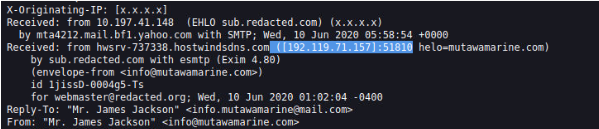
Flag: 192.119.71.157
Task 6: Who is the owner of the originating IP?
Search this ip with IP WHOIS Lookup
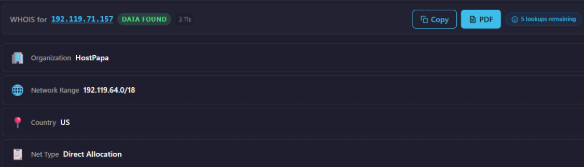
Flag: HostPapa Run an SPF record check on the Return-Path domain identified in the email headers.
Task 7: What is the full SPF record for this domain?
Copy this domain and paste to SPF Surveyor: mutawamarine.com

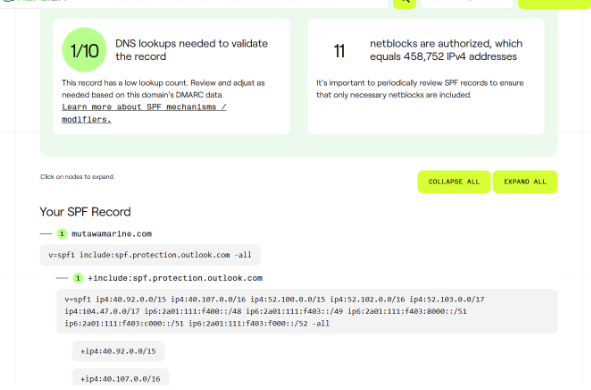
Flag: Hv=spf1 include:spf.protection.outlook.com -all
Task 8: What is the complete DMARC record for this domain?
Check this domain with (https://ondmarc.redsift.com/spf-surveyor).
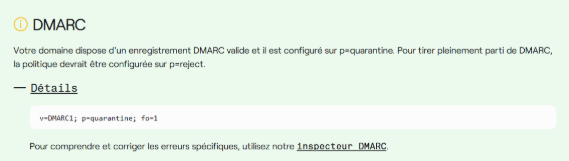
Flag: v=spf1 include:spf.protection.outlook.com -all
Task 9: What is the file name of the attachment found in the email?
Search thì key attachment to find file name
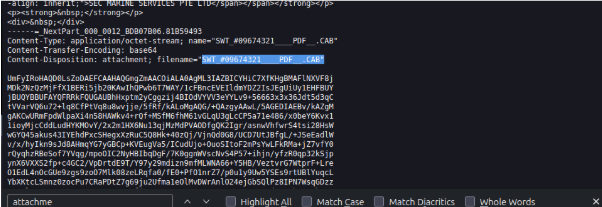
Flag: SWT_#09674321____PDF__.CAB
Task 10: What is the SHA256 hash of the file attachment?
Run sha256sum SWT_#09674321____PDF__.CAB to find flag
sha256sum SWT_#09674321____PDF__.CAB

Flag: 2e91c533615a9bb8929ac4bb76707b2444597ce063d84a4b33525e25074fff3f
Task 11: What is the attachments file size? (Don’t forget to add “KB” to your answer, NUM KB)
I copied the hash value and looked it up at virustotal and found the size.
Press enter or click to view image in full size

Flag: 400.26 KB
Task 12: What is the actual file extension of the attachment?
Heading over to the details tab, I saw that the file type is RAR.
Press enter or click to view image in full size
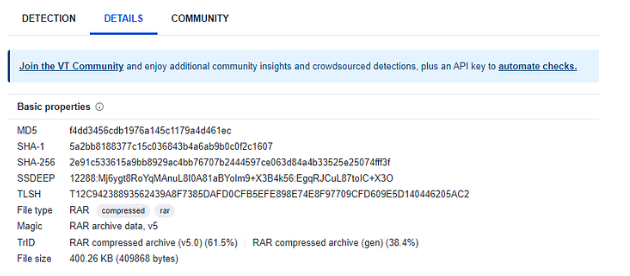
Flag: RAR
Thank you for read my blog, see you latter